
Slaying Dragons - Revisited

Whenever we talk with people about our travels or give presentations about living aboard, we always talk about slaying dragons. It's definitely a recurring theme. We explain that we are not the Cornells, nor the Pardys, nor the Hiscocks. We weren't brought up sailing. We took sailing lessons in our 40s, read lots of books and did lots of charters. In 2000, we finally bought Nine of Cups, sold up and sailed off. Sounds easy when we think about it now, but it wasn't. There were lots of obstacles and challenges along the way to overcome … dragons. We've been meeting lots of folks recently who are thinking about sailing and living aboard or who have just made the plunge (pun intended), so we thought it might be worthwhile sharing this blog post from January 2013 again. A good reminder that on land or or at sea, there are always dragons with which to contend.

It's the Captain's birthday today, by the way. Not a milestone birthday, but another year older and hopefully wiser and certainly more loved than ever. We're out celebrating … no dragon slaying today.

dragon anatomy

“Do one thing everyday that scares you” said Eleanor Roosevelt. I'm not quite sure I agree. I need a break every once in awhile from things that scare me, but maybe once a week would be okay. Really what she means is to keep yourself challenged, not necessarily with life-threatening activities, just traveling into new and uncharted territory once in awhile. Don't be afraid to try new things.

Dragons chart

Old nautical charts frequently used the expression “Here Be Dragons” for uncharted, unknown territories. When we first moved aboard, everything was new and uncharted … our lifestyle, the boat, living on the water instead of land. Heck, even the terminology was different. It wasn't the toilet any more; it was the head. Dreaming the dream of heading off into the sunset on a sailboat is one thing, but actually doing it ... well, that was downright daunting.

golden dragon

Enter the dragons. We define dragons as anything that causes angst. Fears and anticipation that get your heart pounding, adrenaline pumping and/or stomach churning. There were dragons lurking about the first time we took our new boat out into the Gulf of Mexico; the first time we were out of sight of land; the first time anchoring; the first time waiting for a bridge to open; the first overnight passage which included our first overnight watches alone. It was a world of firsts. Each day was a new dragon to face, a fear to overcome, a dragon to slay.

dragon welsh

Dragons come in all sizes and shapes. It doesn't have to be a heart pounding experience. I'm not a seamstress, so when we determined in Ecuador that the cost of replacing the dodger and bimini was too expensive, we decided that I'd make new ones. The dread was palpable. I'd never done this type of a major sewing project before. What if I screwed it up? What if I wrecked all that expensive fabric? What if I failed? Take a deep breath. Think it through. Do some research. Talk out the plan with David. Start the project … then just a little further. Not right? Tear it out and do it again. Be patient. Just a little further. We ended up with a new dodger, bimini, sail cover, winch covers, hatch covers and more. Because once you slay a dragon, you get a new burst of energy and confidence.

Have we had any heart pounding experiences? Oh, sure. I can't imagine anyone living on a boat crossing an ocean that hasn't had at least one or two hairy times. Squalls come up unexpectedly and the first few times, you wonder what the hell you're doing out in this miserable weather with waves breaking over the bow. We've hit rocks and reefs, dragged at anchor, almost had a dragging ship hit us at anchor. The good thing about experiences like this is that they teach you.

chinatown sydney

We've been told “Oh, you're so brave. I could never do what you're doing.” Wrong! You could, if you wanted to. It might not be your cup of tea, but you could do it. I firmly believe, you can do most anything you want, if you want it enough and are willing to slay a few dragons along the way. Give it try. Do something that scares you today. Slay a dragon.
 

Having a Yard Sale - Exhausting Work

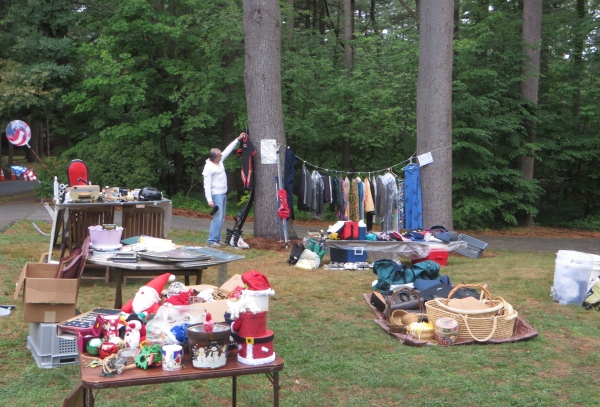
I love going to yard sales, but being on the other end, preparing for a yard sale and then having it is exhausting work. We started by offloading about ~500 pounds of “stuff” from Nine of Cups and transporting it to my sister Lin's. It turns out that was the easy part. How ever did we ever accumulate so much? Once we got all the crap … I mean good stuff ... to Lin's and unloaded, we had to sort it and price it, plan and market the yard sale “event” and then actually participate for two days while people showed up, looked and hopefully bought all the treasures we had for sale. We've done this many times before and we've been reasonably successful at it. We measure success by 1) how much $$ we've made and 2) how much stuff is left at the end of the sale that needs to be carted off to a thrift shop or to the dump. Here's what we've learned …

1. Marketing your yard sale event. If you tell them ... they will come.

Marketing and advertising is important. You've got to let people know that you're having a sale and advance notice is important. We listed our yard sale in the local community newspaper, on craigslist and several local websites that are designed specifically to advertise yard sale/garage sale. Most are free and well worth the effort.

Additionally, signage is critical.

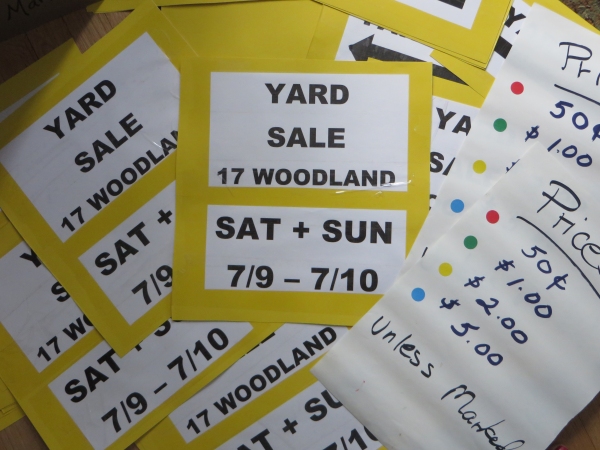
Catching someone's attention when they're driving is difficult, but someone who spots your signs and heads to your yard sale might be a potential buyer. Use brightly colored signs, with consistent colors (some folks might miss the verbiage on one sign, but follow the color), with clear, concise information: Yard Sale, location and date(s) are the key and necessary elements.

good signage

Make sure to place signs in strategic places to insure you draw as many potential buyers to your sale as possible. If you put them out a day or so early, people might make sure to put it on their agenda for the weekend. Also, be a responsible citizen. Remove your signs when your sale is over. We keep track of the number we put out, so we're sure to retrieve them all at the sale's end.

2. Price your stuff to sell

I know you paid $100 for that dress or lots for those skis, but if you want to sell them for anywhere close to what paid, you might consider a consignment shop that specializes in designer clothing or used sports equipment. Otherwise, be happy to get $10-$15 if you're lucky. People go to yard sales for bargains. Things are only worth what someone is willing to pay for them. If you want to move your “merchandise”, you don't have to give it away, but price it reasonably low so it will sell. OR be prepared to donate it or pack it away till the next yard sale.

3. Preparation is important.

Pre-pricing and pre-sorting are two tools to success. We usually use colored adhesive dots with associated published prices on signs scattered around the sale area, e.g. red dot = 50¢, green dot=$1, etc. There's nothing worse than having to ask someone for the price of each item and the only person who knows the prices is with another “customer”.

yardsale_browsing

We try to sort items in advance and put them into the same area ... electronics, antiques, clothing, glassware, kitchen, books, toys/games. If something is particularly distinctive, we put an extra little tag on it with some info … “vintage teapot made in England”. Some folks like to root around in boxes full of junk. You can certainly leave a few boxes of miscellany for this purpose, but usually some sense of order is appreciated. Don't leave good items stuck in their boxes. Take them out so folks can see what they're buying.

Also, make sure you have change ready … lots of dollar bills, quarters, etc. If you're selling higher priced items like furniture, have larger bills available. What's worse than making a sale, but not being able to make change?

change

5. Be ready on time

If your sale is scheduled to start at 8am, have everything out and ready by 8am. People expect that you'll be ready to go when you say you will. Be prepared for early birds and either embrace them or turn them away. Though sometimes frustrating, we prefer embracing.

6. One man's trash is another man's treasure.

Things we don't think will sell, usually do … and vice versa. It's an amazing phenomenon. We put out everything there is to sell and at the end of the sale, we decide if what's left is worth keeping. We usually donate to a locate charity … preferably one that's willing to pick up.

So … how well did we do?

Unless you plan to have your sale inside, one thing you can't control is the weather … especially in New England. The weather forecast vacillated between thunder & lightning, hail and heavy rains to overcast. We took our chances and as luck would have it, we were the only ones who didn't cancel our yard sale on Saturday AND there was no rain. It sprinkled a bit, but we were ready with tarps and never needed them. People showed up steadily and bought lots. Sunday was a bust with off/on showers and few customers. Still, we felt the whole ordeal was successful and worthwhile.

In total, the family netted just under $800 for stuff we didn't need and/or want any longer. We've called a local charity to pick up the rest and Lin's basement is pretty empty … lots of room for more stuff. We plan to celebrate with a New England lobster feast at home … then Lin and I plan to go to yard sales next weekend.

By the way, I logged over 10,000+ steps on my FitBit each day … the best kind of exercise … I didn't have to think about it.

The Blue View - Recycling a Hard Drive

For the next year or so, we don't plan to be sailing quite so far from home as we have been. This means we can offload a ton or so of provisions, spare parts, extra anchors and tools. The list of now non-essential gear includes a couple of older laptops we kept around in case we had major problems with our newer ones. The older laptops still have value to someone, and we thought we'd either sell them or donate them to some worthwhile charity. It isn't wise to divest of a computer without first sanitizing the hard drive, however. It contains all sorts of personal and security information like bank account numbers, credit card info, Social Security numbers and passwords. Any savvy 12-year-old can find your browsing history, then use the saved information on your hard drive to sign into your bank or credit card accounts. It's literally child's play.

Likewise, all those old tax returns and bank statements are hiding on the disk. It isn't enough to delete a file - this doesn't remove it from the hard drive. Deleting a file only moves the name of the file and its link from the main directory to the Recycle Bin. Emptying the Recycle Bin doesn't delete the file either – it only removes the file name and link from the Recycle Bin directory. The actual file data remains on the hard drive until it is written over by new data. Reformatting the hard drive is better, but a reasonably good hacker can still collect a lot of information.

When I was just a pup and in the Navy, I was stationed at a facility that had large rooms full of computers, and it was my job to help diagnose and repair computer hardware problems. If a hard drive crashed and needed to be sent off site, it had to be sanitized first to make sure no classified information made it into the hands of the bad guys. Those hard drives were the size of a 55 gallon drum on steroids (and had 1/1000th the capacity of a smaller memory stick these days), and every inch of the drum had to be degaussed using a handheld electromagnet.

Sanitizing the hard drive on our old laptops isn't that difficult, but does take time. Here are a few options. Don't forget to double check that you've copied and backed up any information you might want later!

  • Destroy the hard drive. If the hard drive is removed from the computer and physically destroyed (beaten into bits with a hammer, drilled through several times, melted into a gooey mess, etc.), no one will be able to recover any data from it. The computer is pretty much worthless at this point of course, unless someone wants to go to the trouble and expense of buying a new hard drive.

destroy the hard drive

  • Restoring the drive to factory condition. Free or inexpensive software can be downloaded that will create a bootable CD, then write the entire hard drive to ones and then to zeroes several times. The current thinking is that repeating this cycle three times is sufficient to make any pre-existing data unrecoverable. Once this process is completed, the original restore CD is used to load the operating system. Depending on the size of the hard drive, this process can take anywhere from several hours to a few days, but the end result is a usable, but sanitized computer.

back to factory settings

  • Manually clean the hard drive. It is possible to delete and overwrite all the data and remove all password and private information from the hard drive. This takes less time than restoring it to factory condition, but has a high risk of leaving something important on the hard drive.

So what did we do? We still had the original restore disk for one of the laptops, and I restored it to factory condition. The hard drive was 80 GByte, and the entire process took 18 hours. We somehow lost the restore cd for the second laptop – it's probably stowed in some safe place aboard Nine of Cups – so restoring it to factory condition was more problematic. Instead, I manually cleaned the hard drive as follows:

  • Uninstall programs. I uninstalled a few dozen apps and programs that weren't necessary. I left a few programs that might be useful to a new owner like Adobe Reader and Open Office.
  • Delete passwords. The computer saves website passwords and 'form content' – the information like our names, address, phone number, SSN, credit card numbers, etc. that we routinely use to fill in forms. This information makes it quick and convenient when we're ordering something online, but also makes it easy for a thief to steal our identities or access our accounts. I spent an hour or so researching the topic online and deleting all the browsing history, cookies, passwords and form content from the laptop.

deleting passwords

  • Delete data files. I deleted all data files, downloaded files, videos, pictures, .PDFs, etc. I went through every file and directory on the C drive. Then I emptied the Recycle Bin.
  • Defragment the hard drive. Files are stored on a hard drive in small blocks that are linked together. For example, a 1 MByte .JPG file might consist of 1000 1KByte blocks that are all linked together. When the disk is new, the blocks making up a file are stored contiguously, but over time as files are written and deleted, the newer files become fragmented. Defragmenting a hard drive moves all blocks of all the files to one contiguous region of the hard drive. I defragmented the hard drive to overwrite any small areas of the disk and to consolidate the free space into one large block.
  • Overwrite the free space. To make sure the data in all the free space was overwritten, I copied innocuous data files from an external hard drive to the computer's internal hard drive. The data I used were movies – I copied a few hundred movies from one of our external drives - enough to entirely fill the internal drive. Then I deleted the movies (from the internal drive only, of course) and emptied the Recycle Bin.

The process took about 10 hours for a 200 GByte drive. I'm feeling relatively confident that any sensitive data is either gone or more work than it is worth to recover – but then, ignorance is bliss. If there are any IT guys or benevolent hackers out there who have any suggestions, I'd appreciate any input, before the $27.97 in our checking account gets raided.