

Apps for the Camino
/
We’ve Downloaded a Slew of New Apps
Walking the Camino Portugués: There’s an App for That
When we walked the Via Francigena a few years ago, there were many times when we realized two important things: first, this was an incredible, life-affirming journey… and second, we had absolutely no idea whether we were on the correct path or confidently hiking through someone’s private vineyard.
In theory, a pilgrimage is about simplicity—just you, the trail, and your thoughts. In reality, on the Camino Portugués, it’s you, your thoughts, and a smartphone that quietly reassures you that you’re still heading in the right direction—or at least toward the nearest café.
After weeks of research (and a healthy respect for getting lost), we’ve landed on a set of apps that will hopefully help us stay oriented, connected, and reasonably well-fed—while still pretending we’re rugged, old-world pilgrims… who occasionally pause for Wi-Fi.

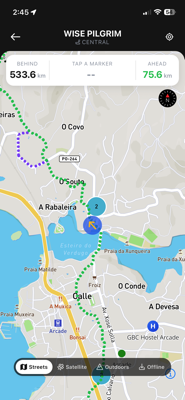
Wise Pilgrim + All Caminos (aka “Am I Still on the Path?”)
Wise Pilgrim is essentially a digital guide who’s walked the Camino a hundred times and knows where everything is—without being judgemental for packing too much.
It offers stage-by-stage breakdowns, elevation profiles (so we can mentally prepare for that “gentle incline” that definitely isn’t), and listings for accommodations, cafés, and resupply stops. For a small fee (about $0.99), we downloaded maps for offline use, which should be invaluable when Wi-Fi and cell service disappear.
Best use: Avoiding those “we definitely missed a turn… two villages back” realizations.
Google Translate (My Multilingual Lifeline)
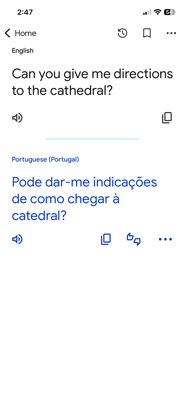
Marcie speaks reasonable Spanish and is learning enough Portuguese to get by. I, on the other hand, operate on a mix of less-than-basic Spanish, optimism, and enthusiastic hand gestures.
That’s where Google Translate comes in. It’s invaluable for ordering meals, reading signs, and clarifying the occasional misunderstanding—like when I accidentally order an espresso with walnuts (but which I’ll drink/chew anyway).
Pro tip: The camera feature is incredibly useful. Point it at a menu and you’ll quickly learn whether you’re ordering grilled fish… or something with tentacles.
MyPostcard (Snail Mail, Without the Snail Pace)
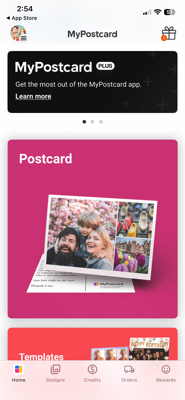
MyPostcard provides a simple way to send physical postcards without tracking down post offices or dealing with international postage. We can upload our own photos, write a message, and have the app print and mail the card from and to anywhere in the world.
It handles printing, postage, and delivery, requiring only a Wi-Fi or data connection. Delivery times vary but are generally reliable. It’s a convenient way to share our journey in a tangible format—without adding extra items to our already overloaded pack.
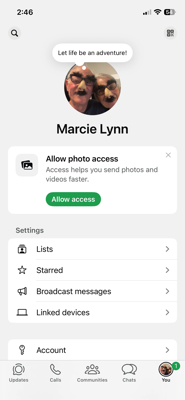
WhatsApp (The Camino Social Network)
WhatsApp is the go-to communication tool across Europe—and especially on the Camino. It allows free messaging, voice calls, and media sharing over Wi-Fi or data.
We’ll use it to contact hosts, book accommodations, coordinate with fellow pilgrims, and reassure loved ones that yes, we’re still alive, just slightly more blistered than yesterday. It’s simple, reliable, and widely used.
Best use: Staying connected with just about anyone, anywhere.
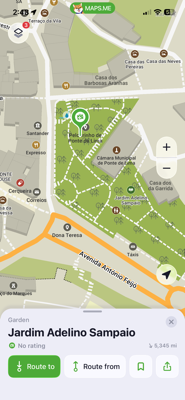
Maps.Me (Our Offline Hero)
When connectivity drops (and it will), Maps.Me provides reliable offline navigation using OpenStreetMap data. We’ve downloaded maps for all of Portugal and Spain so we’re covered no matter where we wander.
We relied heavily on it during the Via Francigena, marking routes and following them to avoid getting too far off track. While Wise Pilgrim may take over most navigation duties this time, Maps.Me is still excellent for finding lodging or nearby points of interest.
Best use: Navigating unfamiliar towns and avoiding unintended detours.
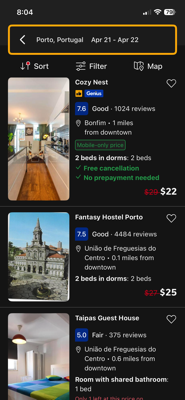
Booking.com (Because “I’ll Find Something” Is a Risky Strategy)
When walking the Via Francigena, we preferred the spontaneity of walking until our legs gave out and then hoping to find a bed. Well not quite, but we rarely made reservations more than a day ahead. This time, on the Camino Portugués which is much busier than the Via, our strategy is less romantic and more practical. We’d prefer not to spend the night in a dormitory on a top bunk, kept awake with a symphony of snoring if we can avoid it.
Booking.com gives us instant access to hotels, guesthouses, and private rooms along the route. We used it to book every night’s stay along our route, and we will undoubtedly use it when booking rooms for the remainder of our stay in Europe after we’ve completed the Camino. We can filter by price, amenities, and location, and most places offer free cancellation.
Rome2Rio (For When Plans… Evolve)
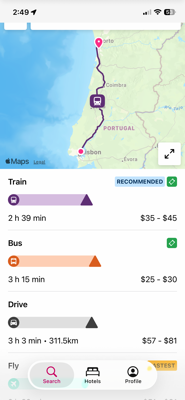
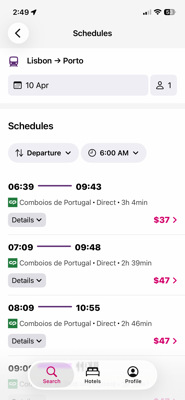
Rome2Rio has been one of our go-to travel tools for years. It helps us figure out how to get from one place to another using trains, buses, flights, rideshares, walking routes… or creative combinations of all five.
It’s especially helpful for navigating unfamiliar cities, getting from transit hubs to lodging, or planning longer moves—like Lisbon to Porto. Enter any location, and it provides multiple route options, including estimated time and cost. For example, one option for getting to Porto was on the FlixBus. A schedule was provided, we chose the bus we wanted, and ordered our tickets right on the app. Easy enough!
Best use: Turning unexpected changes into manageable plans.
Snapseed (Because the Camino Is Too Beautiful for Bad Photos)
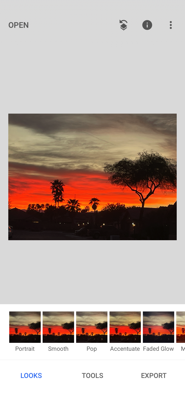
Marcie will undoubtedly take hundreds (possibly thousands) of photos—everything from sweeping coastal views to quiet forest paths to fields of gorgeous flowers… and, based on past experience, a fair number of blurry birds as well.
Snapseed makes it easy to edit photos directly on her iPad. It offers powerful but intuitive tools for adjusting lighting, enhancing colors, and straightening images so they better reflect what we actually saw.
It’s also a great companion to MyPostcard and our blog/website, helping us share the experience in a more polished way.
Best use: Making our photos look as good as the journey feels.
Finally…
Between navigation apps, translation tools, booking platforms, and photo editors, we’ve essentially assembled a small digital support team to follow us across the Camino Portugués. They’ll help us find the path, communicate, sleep comfortably, and document it all beautifully. And despite all that, we still fully expect to get lost, misunderstand any number of things, and delete hundreds of unusable photos.
Some traditions are just too important to abandon.
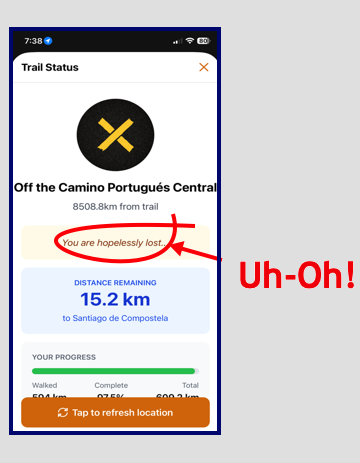
Despite all our digital help, we’ll still probably get lost
Luckily, we’ve found our way to the airport and the long countdown is over. We’re off. Come along with us because At Last… We’re Heading to Portugal!