The Blue View - Recycling a Hard Drive

For the next year or so, we don't plan to be sailing quite so far from home as we have been. This means we can offload a ton or so of provisions, spare parts, extra anchors and tools. The list of now non-essential gear includes a couple of older laptops we kept around in case we had major problems with our newer ones. The older laptops still have value to someone, and we thought we'd either sell them or donate them to some worthwhile charity. It isn't wise to divest of a computer without first sanitizing the hard drive, however. It contains all sorts of personal and security information like bank account numbers, credit card info, Social Security numbers and passwords. Any savvy 12-year-old can find your browsing history, then use the saved information on your hard drive to sign into your bank or credit card accounts. It's literally child's play.

Likewise, all those old tax returns and bank statements are hiding on the disk. It isn't enough to delete a file - this doesn't remove it from the hard drive. Deleting a file only moves the name of the file and its link from the main directory to the Recycle Bin. Emptying the Recycle Bin doesn't delete the file either – it only removes the file name and link from the Recycle Bin directory. The actual file data remains on the hard drive until it is written over by new data. Reformatting the hard drive is better, but a reasonably good hacker can still collect a lot of information.

When I was just a pup and in the Navy, I was stationed at a facility that had large rooms full of computers, and it was my job to help diagnose and repair computer hardware problems. If a hard drive crashed and needed to be sent off site, it had to be sanitized first to make sure no classified information made it into the hands of the bad guys. Those hard drives were the size of a 55 gallon drum on steroids (and had 1/1000th the capacity of a smaller memory stick these days), and every inch of the drum had to be degaussed using a handheld electromagnet.

Sanitizing the hard drive on our old laptops isn't that difficult, but does take time. Here are a few options. Don't forget to double check that you've copied and backed up any information you might want later!

  • Destroy the hard drive. If the hard drive is removed from the computer and physically destroyed (beaten into bits with a hammer, drilled through several times, melted into a gooey mess, etc.), no one will be able to recover any data from it. The computer is pretty much worthless at this point of course, unless someone wants to go to the trouble and expense of buying a new hard drive.

destroy the hard drive

  • Restoring the drive to factory condition. Free or inexpensive software can be downloaded that will create a bootable CD, then write the entire hard drive to ones and then to zeroes several times. The current thinking is that repeating this cycle three times is sufficient to make any pre-existing data unrecoverable. Once this process is completed, the original restore CD is used to load the operating system. Depending on the size of the hard drive, this process can take anywhere from several hours to a few days, but the end result is a usable, but sanitized computer.

back to factory settings

  • Manually clean the hard drive. It is possible to delete and overwrite all the data and remove all password and private information from the hard drive. This takes less time than restoring it to factory condition, but has a high risk of leaving something important on the hard drive.

So what did we do? We still had the original restore disk for one of the laptops, and I restored it to factory condition. The hard drive was 80 GByte, and the entire process took 18 hours. We somehow lost the restore cd for the second laptop – it's probably stowed in some safe place aboard Nine of Cups – so restoring it to factory condition was more problematic. Instead, I manually cleaned the hard drive as follows:

  • Uninstall programs. I uninstalled a few dozen apps and programs that weren't necessary. I left a few programs that might be useful to a new owner like Adobe Reader and Open Office.
  • Delete passwords. The computer saves website passwords and 'form content' – the information like our names, address, phone number, SSN, credit card numbers, etc. that we routinely use to fill in forms. This information makes it quick and convenient when we're ordering something online, but also makes it easy for a thief to steal our identities or access our accounts. I spent an hour or so researching the topic online and deleting all the browsing history, cookies, passwords and form content from the laptop.

deleting passwords

  • Delete data files. I deleted all data files, downloaded files, videos, pictures, .PDFs, etc. I went through every file and directory on the C drive. Then I emptied the Recycle Bin.
  • Defragment the hard drive. Files are stored on a hard drive in small blocks that are linked together. For example, a 1 MByte .JPG file might consist of 1000 1KByte blocks that are all linked together. When the disk is new, the blocks making up a file are stored contiguously, but over time as files are written and deleted, the newer files become fragmented. Defragmenting a hard drive moves all blocks of all the files to one contiguous region of the hard drive. I defragmented the hard drive to overwrite any small areas of the disk and to consolidate the free space into one large block.
  • Overwrite the free space. To make sure the data in all the free space was overwritten, I copied innocuous data files from an external hard drive to the computer's internal hard drive. The data I used were movies – I copied a few hundred movies from one of our external drives - enough to entirely fill the internal drive. Then I deleted the movies (from the internal drive only, of course) and emptied the Recycle Bin.

The process took about 10 hours for a 200 GByte drive. I'm feeling relatively confident that any sensitive data is either gone or more work than it is worth to recover – but then, ignorance is bliss. If there are any IT guys or benevolent hackers out there who have any suggestions, I'd appreciate any input, before the $27.97 in our checking account gets raided.
The Blue View - Sealing a Fuel Tank Hatch

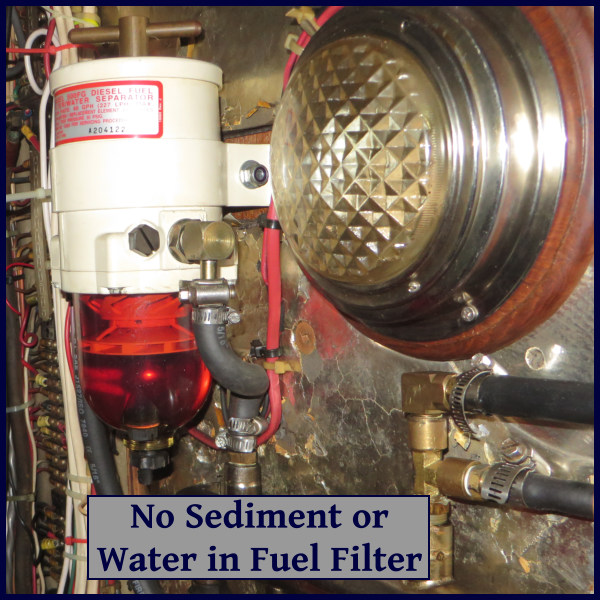
When we first bought Nine of Cups, we had a lot of trouble with contaminated fuel. Water would make its way into the fuel tanks – either through the fill cap or due to condensation inside the tank - allowing grunge to start growing. This would sit in the bottom of the tank until we had a boisterous passage, when the rolling and pitching of the boat would stir it all up. Before long, our fuel filters would get clogged and the engine, starved for fuel, would quit. This usually happened at the most inopportune time, like when we were wending our way through a tight channel or fighting an ebbing current. I now visually check the fuel filters regularly – daily when we are motoring or the first time we start the engine each day. If the filters start accumulating grunge, I know it's time to inspect the fuel tanks and see what's growing in there. In addition, I clean each fuel tank at least annually, polishing the fuel as necessary (see the Blue View on polishing fuel).

hatch fuel filter

To inspect and polish the fuel, it is important to have inspection hatches on the tanks. All our fuel and water tanks have large, ~15” (380mm) inspection hatches, making it less of a problem to see and reach inside the tank. When it's time to open up a tank and take a look inside, I remove the eight bolts holding the hatch in place and lift it off.

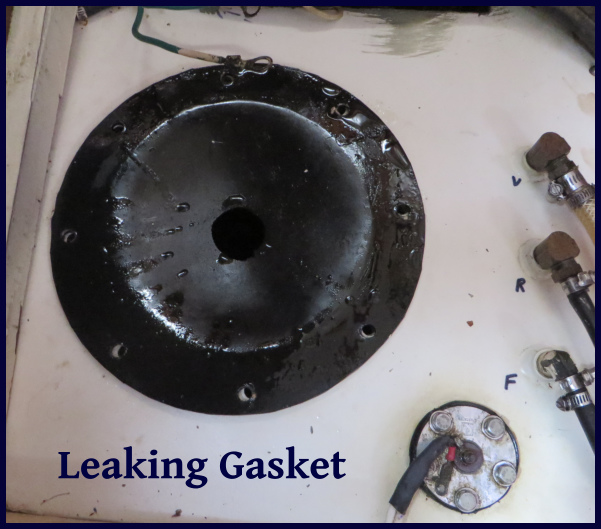
The hatch is sealed with a rubber-like gasket. This works fine on three of our four tanks, but one of our fuel tanks – the one that was fabricated for us in Ecuador - leaks around the hatch. As the hatch is tightened down on this particular tank, the steel around the hatch warps, enough so that it leaks. Actually, it only leaks if we overfill it, or sail on a heel, or do any rolling and pitching – otherwise, it's fine. So one solution to the problem is to only fill it half full and never leave the shelter of a protected marina.

leaking gasket

Another solution, and probably the correct one, is to reinforce the hatch and hatch opening so that it doesn't warp. I can't think of a way of doing this that doesn't involve fabricating steel rings, then welding in-situ and/or drilling and tapping holes in the top of the fuel tank.

A third solution is to find the right gasket. Before I go to the trouble and expense of fabricating and attaching metal parts, I thought I'd try to find a gasket material that worked. I purchased rubber gasket material in various thicknesses and hardness, cut them to size and gave each one a try. None of these was a success.

hardware store

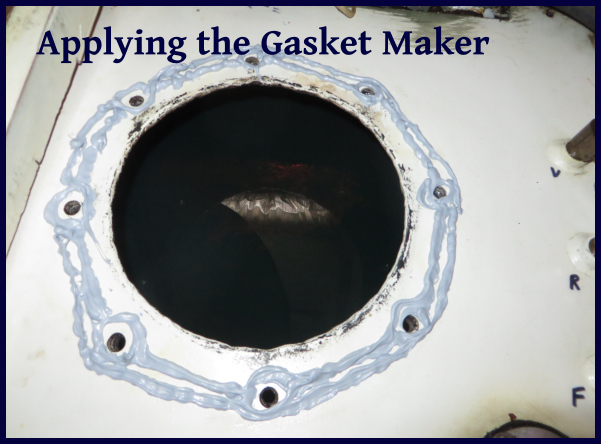
When we arrived in Puerto Rico, I bought some Permatex Gasket Maker – a goop in a tube that can be applied and used to form a gasket. It comes in a myriad of different types for different applications, and I got a version that was impervious to fuels. It was easy to apply, and set quickly. Best of all, it seems to have solved the problem. On our passage from Puerto Rico to St. Augustine, we leaked nary a drop.

gasket maker

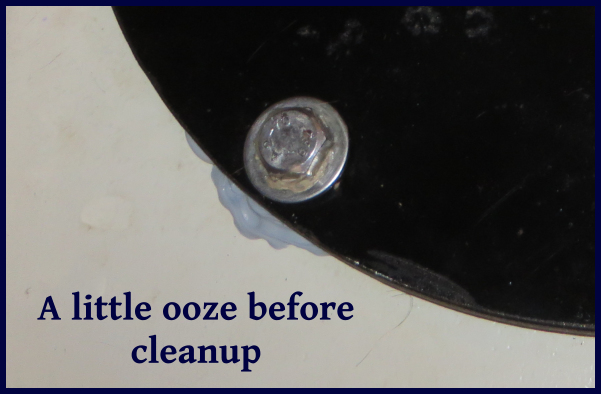
ooze

The only downside is that the hatch has to be removed periodically. I suspect I will have to scrape off the old gasket and reapply fresh goop each time, but even so, as long as I have a tube of gasket maker on hand, this shouldn't cause any drama.

The Blue View - The Ditch vs Offshore

Every year there is a migration of yachties from the south to north along the U.S. Atlantic coast in the spring, and then a reverse migration in the fall. They want to get north before hurricane season starts on June 1, and then want to get south before it gets too cold at the end of the hurricane season in December. I'm guessing, but there must be thousands of boats that join this migration each year. One way of making the trek is the offshore route. When going north, a boat can use the Gulf Stream to make a quick passage. Going back south, the Gulf Stream can be avoided by keeping close to shore, well within the 100 fathom depth contour, or by heading well offshore. This path often includes a stop at Bermuda, and is a good route if the destination is the Caribbean.

The other method is to follow the Intracoastal Waterway or ICW - often referred to as the Ditch. The ICW is a series of rivers, canals, inlets and lakes that are all interconnected. A boat can travel from New Jersey to Miami and beyond, all within protected inland waters and never enter the ocean.

ditch map

There are a lot of positives to using the ICW, especially if the joy is in the journey. The pace is slow, and there are new and wonderful things to see at every bend, from urban seaports to dense swamps to bucolic villages to rolling hills and pastures. We know several cruisers who sail up and down the ICW every year and never tire of the diversity of things to see along the way.

We sailed portions of the ICW during our first two years of cruising, and we found that, for us, there were several pros and cons. The pros:

  • Weather. Good, accurate weather reports are always available, and while encountering a thunderstorm in the confines of a narrow channel or river is no fun, usually there is some warning and a place to hunker down and wait it out. Likewise, if the weather calls for a day or two of crappy weather, we can find a protected anchorage and wait for it to pass. Offshore, we do the best planning we can, but once out there, we have to take what we get.
  • Daylight travel. It's nice to be able to stop at the end of each day, drop the hook in a quiet anchorage, and enjoy dinner together, then maybe a movie before going to bed – as opposed to the three hours on/ three hours off of our night watch schedule while on a passage.
  • Repairs. If something breaks on the ICW, it is almost always possible to stop and anchor long enough to make the repair, and help, if needed, is never too far away. Repairing things at sea is always more of a challenge, especially if the boat is rolling and pitching. I've often wished for a couple more hands and a prehensile tail so that I could keep myself, my tools and the parts I'm replacing from sliding around, banging into things and/or falling into the bilge or overboard.
  • Internet. I never thought I'd say this, but we do miss our internet connection while at sea. Most of the ICW has at least cellular coverage, and wifi hotspots are common.

The cons:

  • Motoring. We motored most of the sections we traveled, sailing very little and using a lot of fuel.
  • Depths. The controlling depths are 10 feet between Norfolk, VA and Fort Pierce, FL, but what dredging is done doesn't keep up with the shoaling that occurs. We draw 7' 2”, which is quite deep for the ICW, and we found ourselves stuck in the mud on several occasions. I had read that if you stay in the marked channel, there will be plenty of water, but I vividly remember being hard aground while being smack-dab in the middle between a red and a green channel marker. I've yet talked to a cruiser that draws more than 6 feet that didn't run aground at least once while traveling any distance on the ICW. Some of the new apps, like Active Captain help in this regard. They compile comments and notes from hundreds of other cruisers who have navigated the same waters ahead of you, providing a wealth of current local information about hazards and shoaling.

dredge at work

  • Hand Steering. We are used to sailing long, offshore passages, where the autopilot does most of the steering. We still keep watch, but it usually doesn't require the same constant vigilance as hand steering along a narrow channel.
  • Low Daily Distances. The pace is slow and, for the most part, traveling along the ICW is only during daylight hours. We averaged 50-60 miles a day, and typically stayed put every third or fourth day. This can a positive – who doesn't dream about taking a slow, leisurely trip along most of the eastern seaboard. On the other hand, we usually dawdle too long in whatever place we are, and end up having to rush to make up time.
  • Stress. There certainly are stressful moments on an offshore passage, but if the weather is good and nothing major breaks, ocean passages are usually pretty benign. The ICW can be stressful, especially at first, from unexpected shoals, narrow bridges, cross currents, thunderstorms, tugs and barges that need almost the entire channel, power boats passing at high speed, other yachties, and the constant vigilance that is required just to keep us in the channel. I was exhausted at the end of each day until I started getting into the groove.

start of the icw

So what will we do? As usual, we stayed too long in Trinidad, Puerto Rico, and now St. Augustine, and we will have to make a beeline for the Chesapeake. Next fall, however, we may do a good portion of the ICW on our way south – assuming we can extricate ourselves from the charms of the Chesapeake.